projects / healthops planning platform
HealthOps × Ideate Innovation
A planning platform where every report doesn't just show the numbers — it tells leadership what they mean, and stays current on its own.
the reframe.
01
insight, not decoration
What does it do:
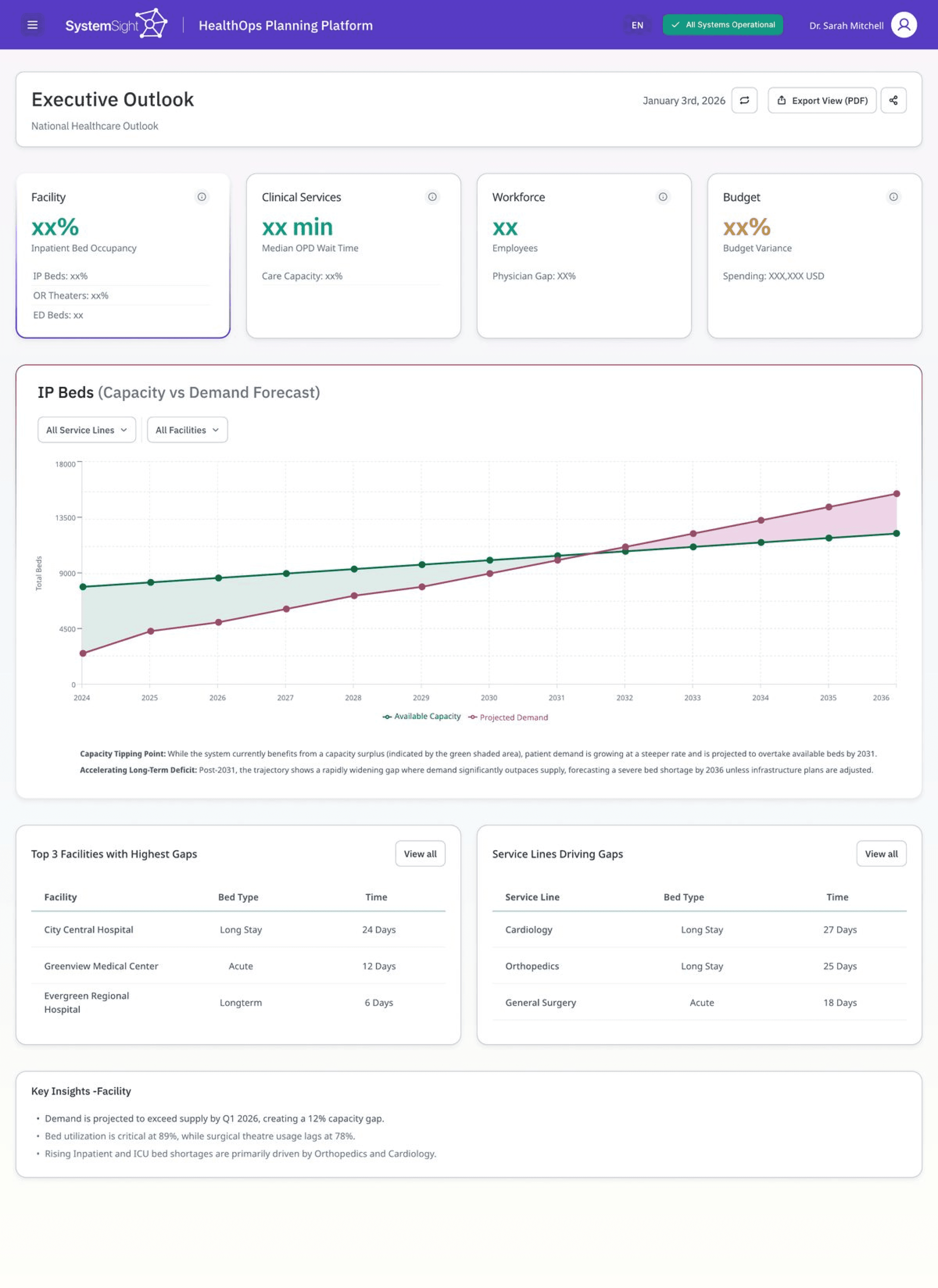
The Executive Outlook is a top-level read on whether the system can meet demand. From here the platform splits into four pillars, beds, workforce, clinical services and budget, each with its own screen.
Decisions:
We led with a single forecast chart instead of a grid of widgets or diagrams, because that projection is what leadership needs before anything else. The graph is interactive, with hover details and the important points marked along the line. Subtle visual cues do the rest of the work: colour-coded points, a defined stroke on the active item, and cards to set one section apart from the next. The key insights below carry the rest of the story in plain language.
1
The forecast chart, front and centre
visibility of system status
2
Marked points indicating hover functionality
recognition over recall
3
Insights written as conclusions, not chart labels
match to the real world
executive outlook · forecast
02
access & wait times
What does it do:
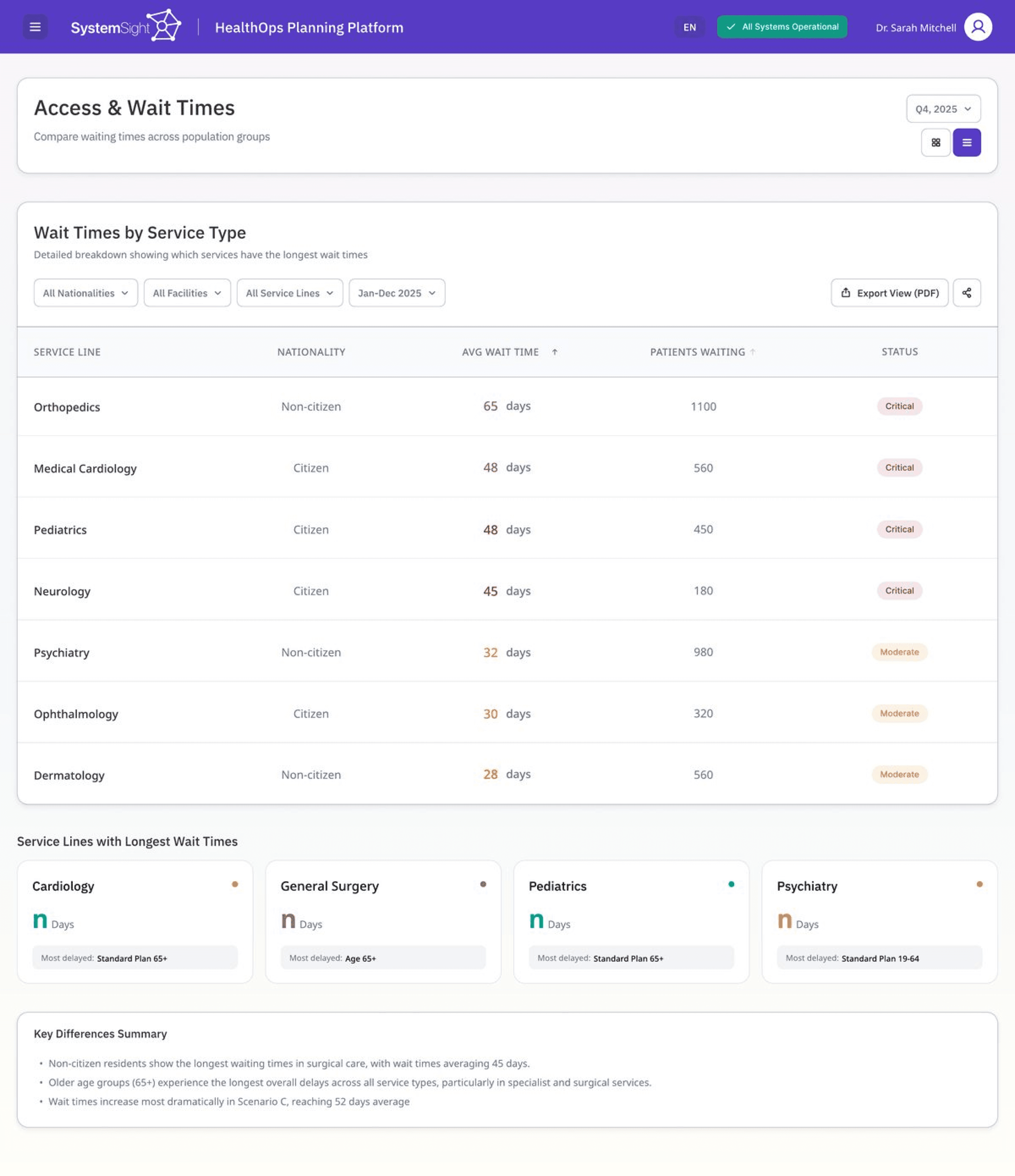
This screen shows how long patients wait across services and facilities. Planners use it to decide where capacity needs to move, so the job is to surface the worst cases fast.
Decisions:
We showed severity as colour rather than a number, so the critical rows register before you've read a value. The table sorts by the longest waits by default, which lets the order do the triage. A short summary under the table names the pattern, so the numbers and their meaning stay together.
1
Longest waits sorted to the top
visibility of system status
2
The colour-coded severity column
recognition over recall
3
The plain-language summary below
match to the real world
access & wait times
03
Reports that stay alive.
What does it do:
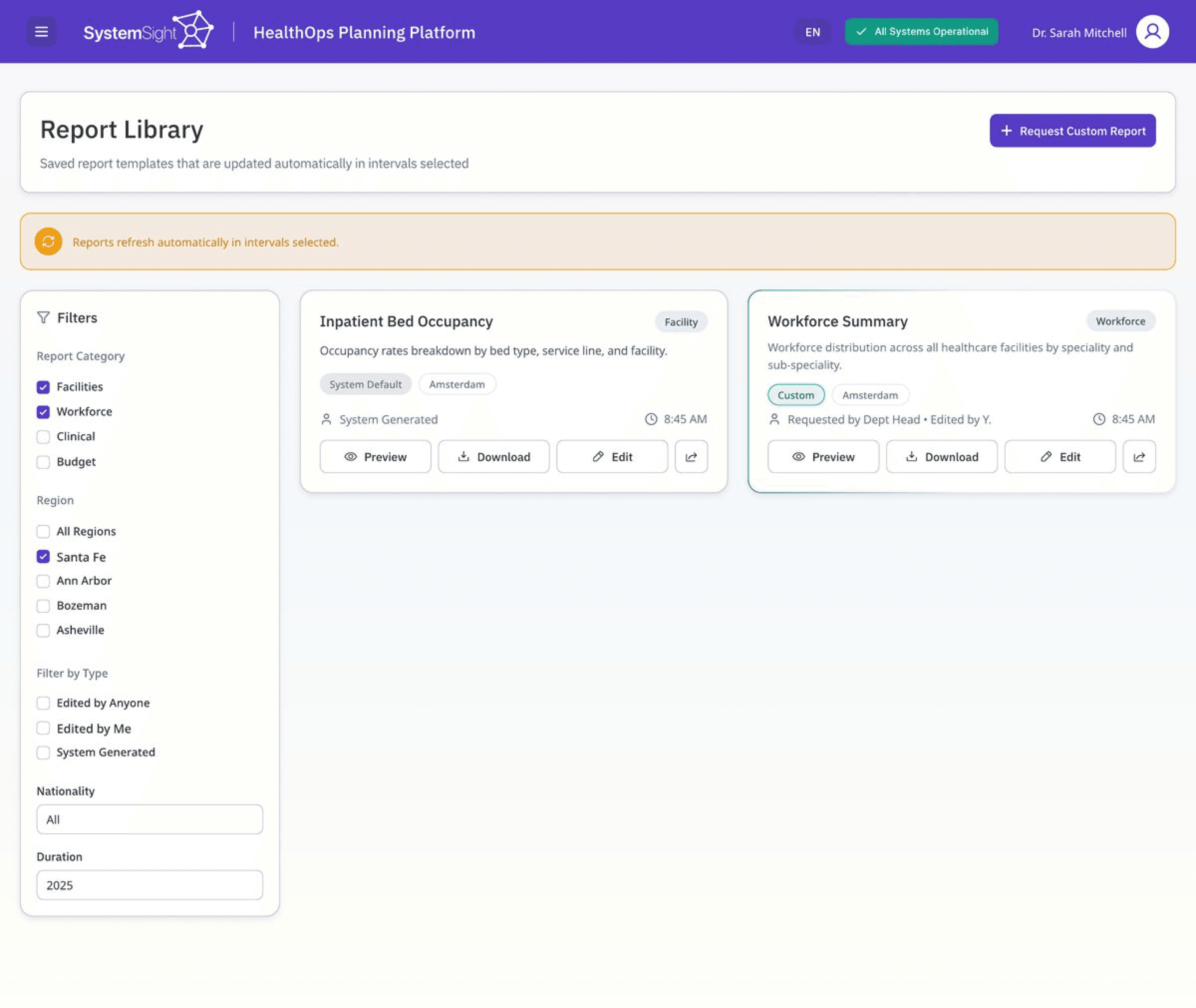
The report library is where teams keep the reports they rely on, both the system's standard ones and their own custom requests. The risk with any reporting tool is that saved reports quietly go stale.
Decisions:
We set the reports to refresh on a schedule and kept that state visible, so the data reads as current instead of something to double-check. System and custom reports look the same and sit on one shelf, so where a report came from never becomes a thing to think about. Filters sit to the left of the content, where scanning starts.
1
The refresh status indicator
visibility of system status
2
System and custom reports on one shelf
consistency & standards
3
Filters placed where scanning begins
match to the real world
report library
1
04
Data quality Hub
High-stakes data organised for clarity
What does it do:
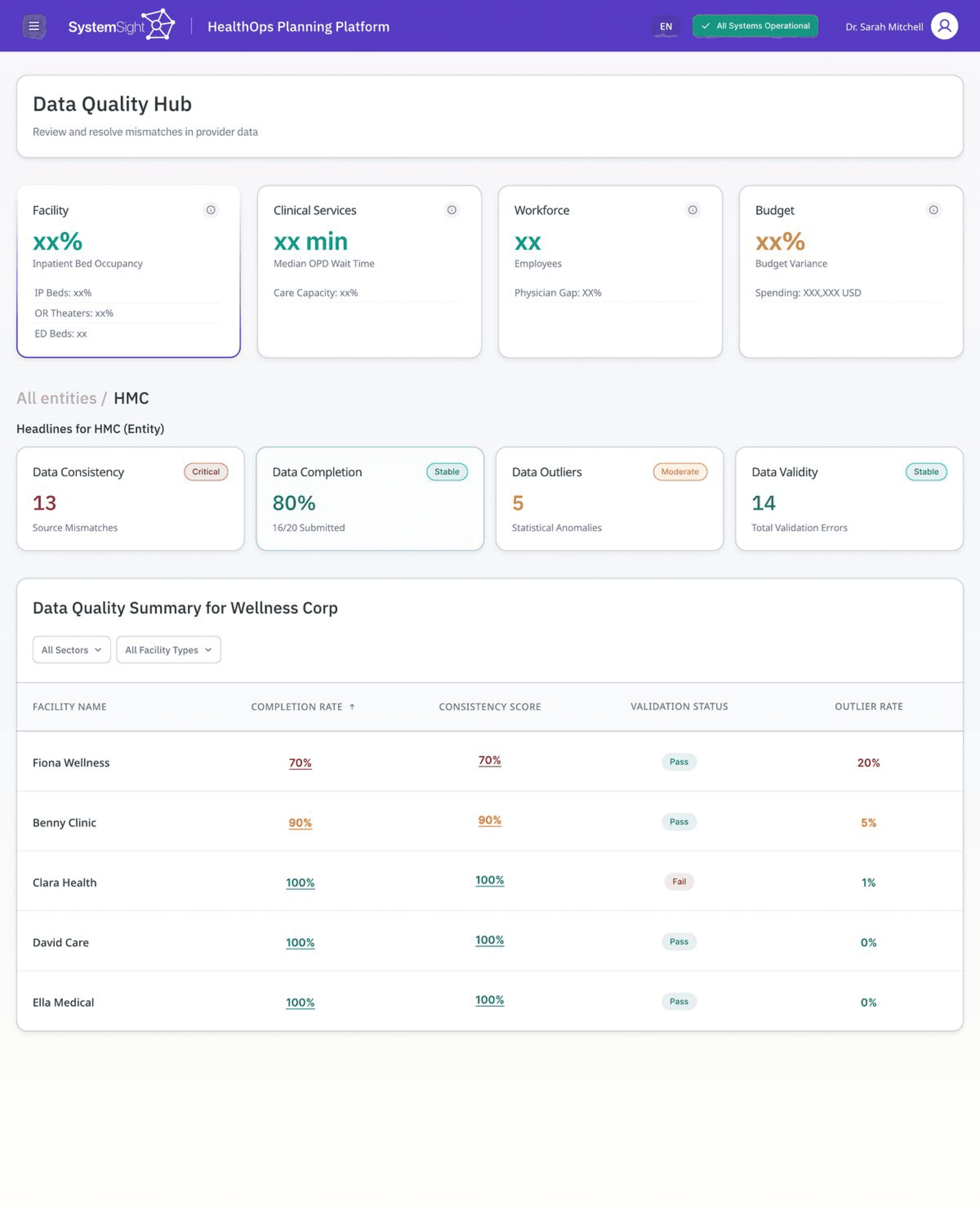
Every number in the platform depends on the data underneath it being clean. This is where teams catch mismatches and validation errors before they reach a report, so the screen carries a lot of dense information at once.
Decisions:
We carried the same status language from the rest of the platform into this screen, so nothing has to be relearned here. Validation reads as pass or fail rather than a score to interpret, so each row resolves at a glance. The layout came out of the client's real brand tokens, rebuilt in Figma.
1
consistency & standards
2
The pass / fail validation column
recognition over recall
data quality hub
1
2
the Outcome.
See something you like or have any questions?
Drop us an email at aliza@ideateinnovation.com


projects / climate finance accelerator
Opening a climate
accelerator to the people who
could
fund it.
Leading communications for the UK Government's Climate Finance
Accelerator in Pakistan, from strategy and brand to a launch that drew around
55 applicants and a cohort of 11 climate businesses.
CFA Pakistan · UK Government × DAI
CFA Pakistan
UK Gov / FCDO · via DAI
Client
Communications
Lead
Role
Strategy · Campaign ·
Brand · Stakeholders
Scope
DAI · PwC · BHC ·
MoCC
Partners
2026
Year
Delivered as Communications Lead on CFA Pakistan, a UK Government (FCDO) programme implemented by DAI. Campaign
materials shown are public. The strategic communications plan is confidential and is described here, not reproduced.
Drop launch event photo
Soft launch at the Ministry of Climate Change, with the British High Commission
the reframe.
An accelerator only works
if government, investors,
and businesses
move together.
CFA is a UK Government programme that helps climate businesses become
investment-ready. On paper it's an application process. In practice, none of it
happens unless three groups arrive at the same time: project developers who
need finance, the investors and banks who might provide it, and the government
voices that make the whole thing credible.
So communications wasn't posting updates. It was building one clear narrative
and the coordination behind it, so a UK-funded programme would land as a real,
deal-oriented opportunity, and convert into a pipeline.
The mandate
One programme,
many tables.
As Communications Lead for Phase II, I owned the narrative and the channels
across the full launch cycle, coordinating with the CFA global comms team at
PwC, the British High Commission, DAI, and the Ministry of Climate Change so
every voice pointed the same way.
Government
Ministry of Climate Change & policy leads, for
credibility and signal
Investors
Banks, DFIs and institutional investors, for future
deal flow
Climate businesses
Project developers seeking finance, the applicant
pipeline
CFA Pakistan
one narrative, one set of channels, one call to act
Delivered with
UK Government · FCDO
DAI
PwC
British High Commission
Ministry of Climate Change
What I led
01
the strategy
A plan built around
conversion.
I wrote the Phase II strategic
communications plan: objectives, audience
map, key messages, and an integrated
outreach approach across digital, direct
network activation, strategic engagement,
and media. It set the through-line for
everything that followed, reigniting the
alumni network as ambassadors and leaning
on high-level endorsement to open the call.
Optional
Strategy / audience-map visual
Confidential plan, so use an anonymised
diagram or skip.
02
campaign & brand
The visuals that
opened the
call.
I created the campaign that opened the Call
for Proposals: the application drive, the
women-led innovation push timed to
International Women's Day, countdown
banners, and the Q&A webinar promotion,
all in the CFA and UK Government brand
system, published across LinkedIn and the
programme's channels.
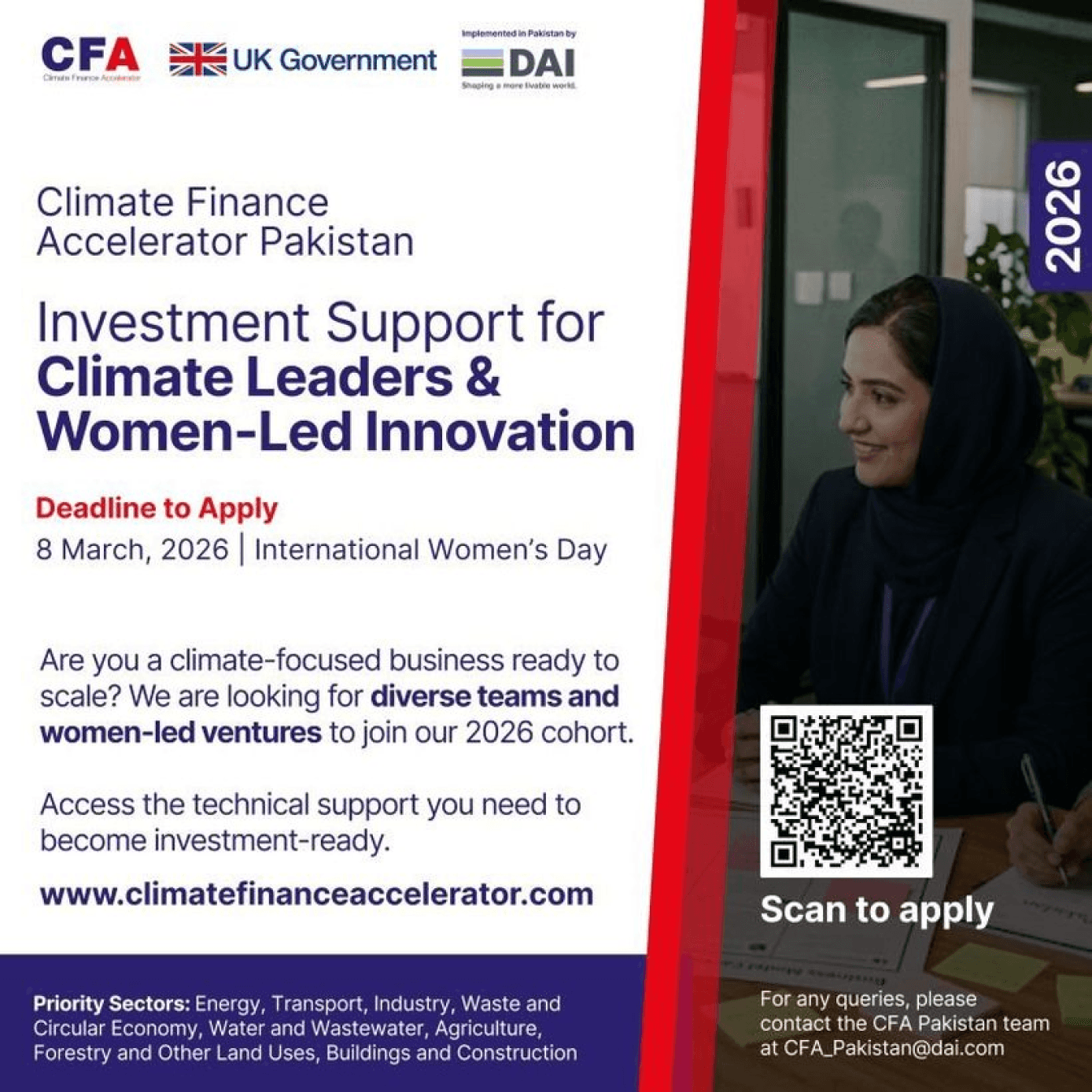
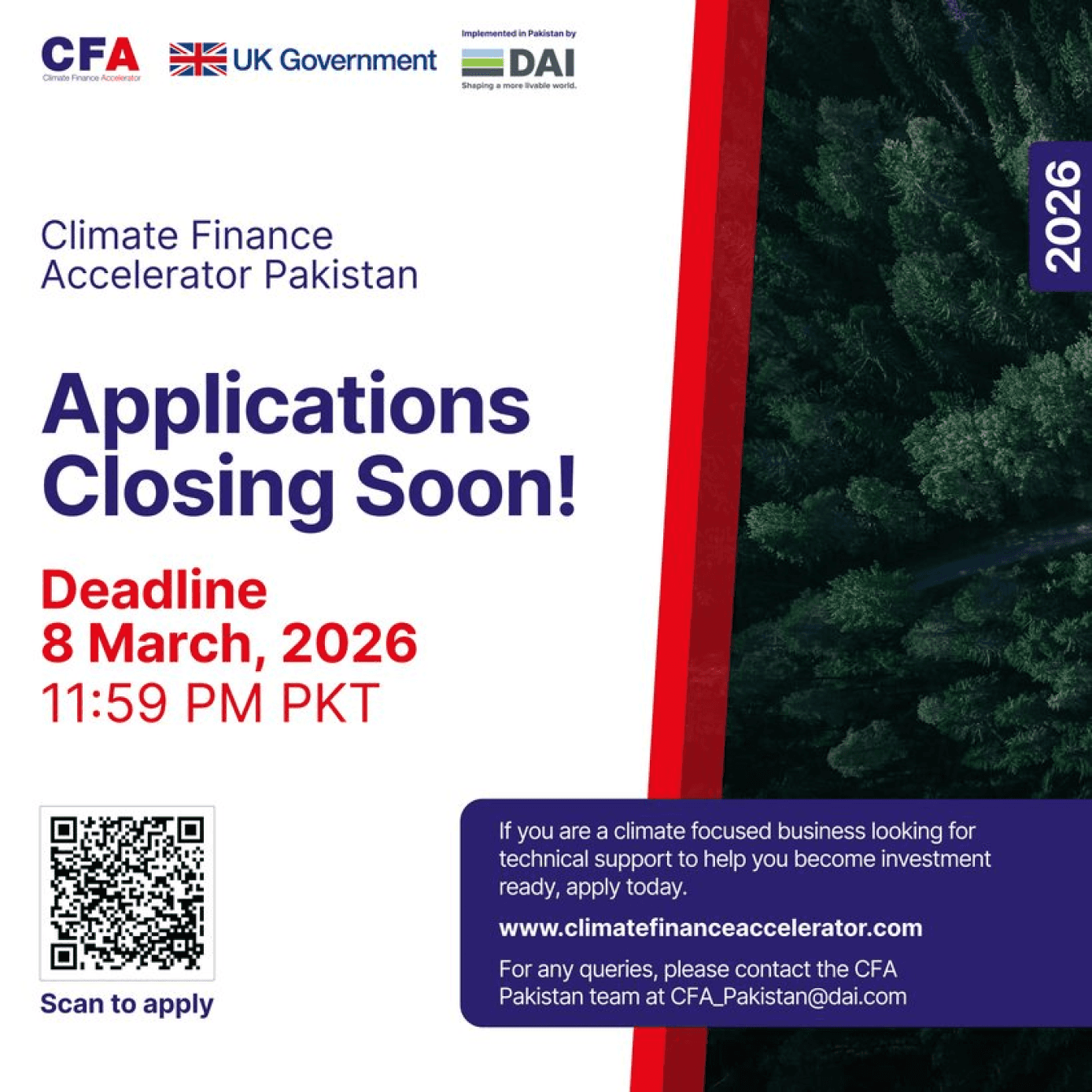
Public campaign posters. The women-led-innovation drive set the deadline on International Women's Day; countdown
creative carried the closing week.
03
stakeholders & launch
Getting the right
people in the
room.
I organised the soft-launch event, bringing
the British High Commission and the
Ministry of Climate Change together to
open the cycle, and coordinated high-level
video endorsements across BHC, PwC, DAI
and MoCC so the launch carried weight. To
sustain it, I ran stakeholder endorsement
interviews and turned them into social
content that put credible voices behind the
programme.
Drop photos
Launch event · stakeholder interview stills
Event photos and endorsement clips go
here.
the lifecycle.
Comms across the whole
cycle.
The launch ran in four phases, each with its own comms job, from reigniting past
cohorts to announcing the new one.
I · Pre-launch
Re-ignition
Teaser content from past cycles, the
website and portal readied, alumni
primed as ambassadors, press lined
up.
Jan
II · Soft launch
Visibility
In-person event at MoCC with the
BHC, the call opens, high-level video
endorsements released, media
captured.
late Jan
III · Call for proposals
Pipeline
Regional sessions across Karachi,
Lahore and Peshawar, Q&A webinars,
countdown creative, partner toolkits.
Jan–Feb
IV · Selection
Announce
Thank-yous to all applicants, then the
cohort reveal: the climate businesses
CFA would support.
Mar
the outcome.
A credible launch, and a
cohort.
The campaign converted awareness into a real pipeline and a selected cohort,
with the programme positioned across government, investors and the climate-
business community.
~55
applications to the call for
proposals
11
climate businesses selected for
the cohort
4
partners coordinated — DAI, PwC,
BHC, MoCC
1
strategy carried end to end,
launch to selection
next project
What She Carried
→
© aliza — all rights reserved
CFA Pakistan · UK Government × DAI
a
.
about
projects
contact